How does the automatic candidate import work?
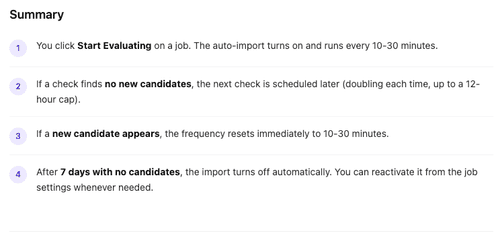
When you click Start Evaluating on a job in Brainner, the platform activates an automatic import that continuously syncs new applicants from your ATS. You don't need to manually refresh or re-import — Brainner handles it in the background.

How often does Brainner check for new candidates?
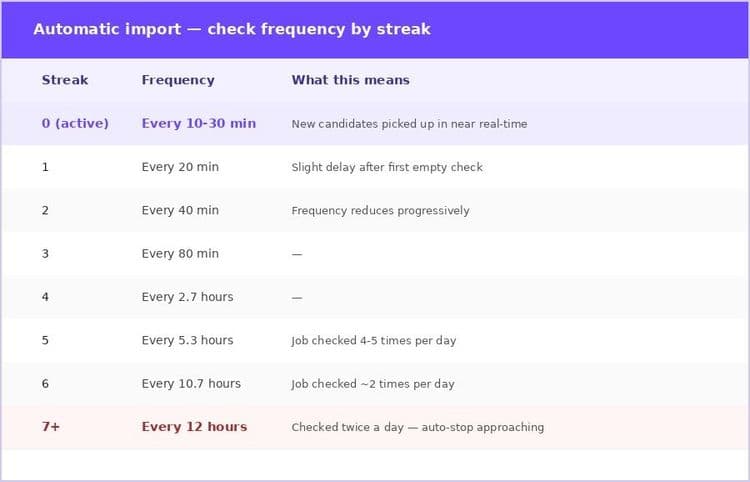
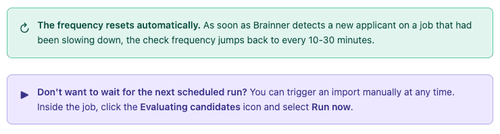
To avoid unnecessary load on your ATS, Brainner uses a smart backoff system: if a job isn't receiving new applications, the check frequency gradually decreases. As soon as a new candidate is detected, the frequency resets to its fastest setting.
What happens if a job has no new candidates for 7 days?
If Brainner checks a job every 12 hours and finds no new candidates for 7 consecutive days, the recurring import is automatically turned off for that job.
This is expected behavior for roles that have closed, paused, or simply stopped receiving applications.

Still have questions? Reach out to us via the help icon in Brainner or email support@brainner.ai
Frequently asked questions
Learn more about Brainner
No. Once you click Start Evaluating, the import runs automatically. Brainner adjusts the frequency on its own based on application activity.
No. The import still runs; it just checks less often when no one has applied recently. Any candidate who applies while the import is at a slower frequency will be picked up at the next scheduled check — at most 12 hours later.
Go to the job in Brainner and click Start Evaluating again. The import will restart at its full frequency (every 10-30 minutes).
Yes, but intentionally. A slow job will be checked less often, which is accurate — there's no point checking every 10 minutes for a role that gets one application a week. The moment a candidate applies, the system picks it up at the next check and speeds up again.
Yes. You can check the last import timestamp by clicking in the 'Evaluating Candidates' icon inside the job in Brainner.
Yes. Inside the job, click the Evaluating candidates icon and select Run now. The import will run immediately.
Still have questions?
Book a demo or .