Criteria Definition Best Practices
A – Criteria Definition
General Concepts
Defining resume screening criteria in Brainner is a crucial part of the process, as our AI will follow your instructions precisely to evaluate candidates' resumes based on the specified requirements.
Our AI can perform semantic searches, meaning it understands context, synonyms, and jargon. Unlike typical keyword matching, you don't need to be overly specific with every word, but you do need to be accurate in explaining, detailing, and quantifying what you truly need from candidates.
Best Practices
🤔 1. When in doubt, include the requirement anyway.
If you're unsure whether a requirement should be part of the screening, add it as a neutral criterion. Neutral criteria don't impact the candidate's score, but they give you the flexibility to filter, sort, or analyze candidates by that requirement later when navigating the results.
This way, you avoid losing relevant information up front and keep the option open to use the criterion later if needed, without having to re-evaluate candidates.
🔍 2. The more specific the criteria, the more accurate the results.
Example 1
"Experience working at Google" – The criteria will be met if the candidate has worked at Google.
"Experience working at companies like Google" – The criteria will be met if the candidate has worked at companies similar to Google, but this is still somewhat vague, and the analysis may be subjective.
"Experience working at global tech companies like Google with operations in the USA" – This is a more specific criterion that allows our AI model to conduct an objective analysis.
Example 2
"5+ years of experience as a Purchasing Manager in the retail industry" – This is a clear and specific criterion. Our AI model will award the full score only if the candidate meets all aspects of the criterion. If only some are met, the score will be reduced to half.
You can also choose to break this down into two separate criteria with different weights:
"5+ years of experience as a Purchasing Manager" – Full score if the candidate meets all conditions; a partial score if, for example, they have only 2 years of experience.
"Experience in the retail industry" – Full score if the candidate has worked in the retail industry, even if not as a Purchasing Manager.
❓ 3. Write criteria that answer the question: "What requirement should the candidate meet?"
Example 3
"Must be based in the USA" (Correct)
"USA" (Incorrect)
Example 4
"5+ years of experience with TypeScript" (Correct)
"TypeScript" (Incorrect)
🔤 4. Write clear criteria, avoiding abbreviations.
Example 5
"Holds a degree in Business Computer Science" (Correct)
"Holds a degree in BCS" (Incorrect)
✅ 5. Quantify work experience and skills.
AI works best with clarity. Instead of saying "strong experience," define what that means (e.g., "3+ years using Python", "managed teams of 5+"). When you quantify, Brainner can score resumes more accurately and surface the best matches faster.
Example 6
"Experience as a Back-End Developer" – This could result in a full score for just 1 year of experience (Not specific).
"5+ years of experience as a Back-End Developer" – Full score only if the candidate meets the 5-year requirement. Partial score if they meet the experience but not the years (Correct).
Example 7
"Experience with Python" – Full score could be awarded even if the experience was 10 years ago (Not specific).
"Experience with Python in the last 2 jobs" (Correct)
Example 8
"2 years of experience with SAP" (Incorrect. It might imply that the candidate should have only 2 years of experience)
"2 or more years of experience with SAP" (Correct)
🧩 6. Break down complex criteria into separate signals.
When a requirement combines multiple signals, split it into individual criteria. This improves filtering, lets you navigate the candidate pool by each signal, and avoids penalizing strong candidates who only meet some of the requirements.
Example 9
Instead of: "Experience in AI and product management, preferably in B2B SaaS", use three separate criteria:
AI experience
Product management experience
B2B SaaS experience
Breaking criteria down keeps recruiters in control of the AI, not the other way around.
🔄 7. Use Boolean strings (AND, OR, NOT) for skills or work experience criteria.
Hiring managers often say things like "We want React OR Angular experience" or "They need to know SQL AND Python AND AWS." Defining the right logic ensures candidates are scored correctly and avoids penalizing strong profiles unfairly.
Example 10
When the candidate must meet all skills requirements:
"5+ years of experience with Adobe Premiere AND Adobe Illustrator AND Adobe Photoshop."
Example 11
When the candidate must meet at least one of the skills requirements:
"Experience with Adobe Premiere OR Final Cut Pro in the last two positions."
Example 12
When you want to exclude specific experiences:
"Experience in sales BUT NOT as a Customer Success Representative."
📍 8. Always include location as a criterion.
Whether the role is remote, hybrid, or in-office, location should always be one of the criteria. Brainner uses this signal to:
-Help detect fake applicants (mismatched location data feeds Identity Check).
-Align candidate filtering with your remote/in-office policy.
-Prioritize proximity when needed.
Option A: Include location in the candidate profile information to filter candidates without affecting the scoring.
Option B: Include location as a criterion. In this case, location will impact the final score.
Example 13
"Must be based in the USA."
Example 14
If you're looking for candidates from different locations or regions, use OR logic:
"Must be based in California OR New York OR Miami."
"Must be based in South America OR Central America."
🎯 9. Add target companies and criteria not listed in the job description.
Hiring managers often have implicit preferences that don't make it into the formal job description, such as target companies, industries, or specific tools. Adding these as criteria sharpens the analysis without making them mandatory, and lets you filter candidates by those signals later.
Example 15
If a hiring manager says, "I love people coming from Stripe, Revolut, or Adyen," add those companies to your target list:
"Previous experience at Stripe OR Revolut OR Adyen."
"2+ years of experience at McDonald's, Burger King, or KFC."
"Previous experience at companies in the SaaS or fintech industry."
🔁 10. Choose whether to consider the frequency of job changes as a criterion.
Some companies evaluate how frequently candidates change jobs. This can be controversial, as frequent changes may be due to circumstances beyond the candidate's control, such as layoffs.
Example 16
"Has spent at least 2 years in each of the last 3 jobs."
🙋 11. Keep soft skills as non-mandatory criteria.
Soft skills such as communication, leadership, or adaptability matter, but they're hard to verify from a resume. We recommend adding them as preferred (non-mandatory) so they appear in the analysis without skewing the overall score.
This avoids unfairly penalizing strong candidates who may simply write shorter or more technical resumes, while still complementing the decision-making process.
📏 12. When searching for candidates within a range of years of experience, split the criterion into two separate criteria.
To reduce the complexity of the criterion and improve the accuracy, it is recommended to split the criterion into two separate criteria when searching for candidates within a range of years of experience.
Example 17
Instead of including "2-5 years of experience in Python", use two different criteria:
"+2 years of experience in Python"
"Less than 5 years of experience in Python"
🚦 13. Use pre-application questions as filters.
Brainner allows you to add pre-application filters to screen out misaligned candidates upfront, saving time before interviews. Common examples include:
-Salary expectation.
-Visa requirements.
-Availability to join the company.
These filters complement the criteria-based scoring and help focus the recruiter's attention on candidates who meet your basic requirements from the start.
B – Criteria Weight Definition
General Concepts
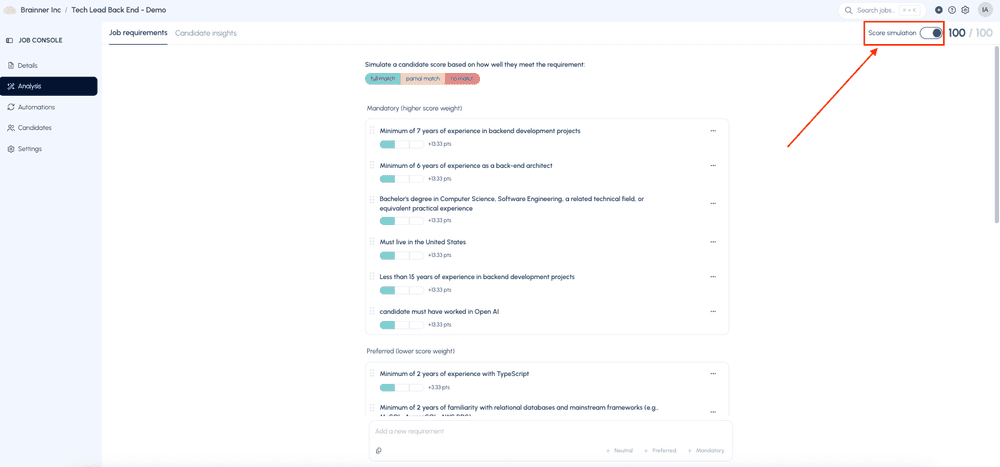
Mandatory criteria represent 80% of the total weight, while preferred criteria account for 20%. It's important to understand how much each criterion will weigh before starting the analysis.
Neutral criteria don't impact the score. They're useful for filtering and analyzing candidates without affecting their final ranking.
Example 18
If you have 5 mandatory criteria and 5 preferred criteria:
-Each mandatory criterion will weigh 16% if the candidate meets the criteria
-Each preferred criterion will weigh 4% if the candidate meets the criteria
- You can check the score distribution in the Analysis tab > Score simulation.
C – Criteria Definition and Weight Calibration
We recommend initially calibrating the criteria definition and weights with a small sample to ensure that:
-The criteria are well-defined, and the output aligns with what you are looking for in that specific requirement.
-The weight assigned to each criterion accurately reflects your hiring goals.
Once the criteria are calibrated, you can proceed with re-evaluating those candidates and adding the complete batch.
📋 Quick Checklist
Before running an analysis, make sure you've reviewed the following:
🤔 If unsure about a requirement, included it as neutral so it remains available for filtering.
❓ Each criterion answers "What requirement should the candidate meet?"
🔤 Avoided abbreviations and used clear, specific language.
✅ Quantified experience and skills (years, recency).
🧩 Broke down complex multi-signal requirements into separate criteria.
🔄 Used Boolean logic (AND/OR/NOT) where multiple skills are involved.
📍 Always included location, considering both filtering and Identity Check signals.
🎯 Added relevant criteria not listed in the job description (target companies, industries, etc.).
🙋 Kept soft skills as non-mandatory.
⚖️ Defined whether mandatory and preferred weights reflect your hiring priorities.
🚦 Set up pre-application filters where relevant (salary, visa, availability).
🧪 Calibrated criteria and weights with a small sample before running the full batch.